
Show summary Hide summary
- How the Pocket Taco turns your phone into a classic handheld
- Comfort, portability and the trade-offs of the “taco” clamp
- Performance, Bluetooth pairing and emulator compatibility
- Which games and platforms suit the Pocket Taco best
- Why the Pocket Taco resonates with modern nostalgia
- Key reasons people choose the Pocket Taco
- Does the Pocket Taco support both iOS and Android phones?
- What types of games feel best on the Pocket Taco?
- Can I use the Pocket Taco as a standalone controller?
- Will the clamp damage my phone or its case?
- Is the Pocket Taco a good replacement for a full-size console controller?
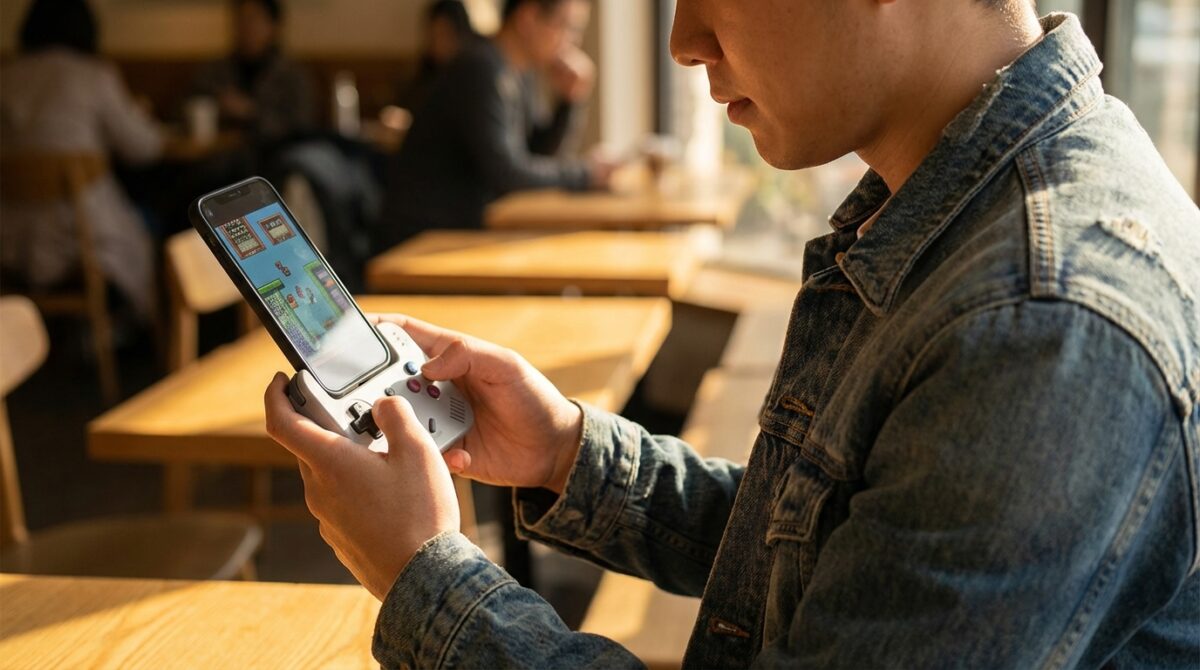
Imagine clipping a small “taco” to your phone and, within seconds, feeling as if you were holding a Classic Game Boy again. No cables, no setup marathon, just instant Retro Gaming with real buttons instead of glass. That is the quiet magic of the GameSir Pocket Taco.
Instead of listing every mobile controller on the market, this perspective focuses on one thing: how the Pocket Taco can Transform your Phone into a portrait-style Handheld that feels familiar, yet works across your entire Mobile Gaming life.
How the Pocket Taco turns your phone into a classic handheld
The Pocket Taco does not wrap around your device like a Backbone or slide on rails like some telescopic controllers. It uses a hinged clamp that bites onto the bottom edge of your smartphone, effectively turning the screen into a vertical console window above a Game Boy-style control deck. This approach keeps the weight centered in your hands, which matters during long gaming sessions on a crowded commute or while relaxing at home.
A Complete Guide to Personalizing Your iPhone Home Screen with iOS 26
Nintendo Unveils Virtual Boy Accessory Enabling VR Adventures with Mario and Zelda on Switch 2
Inside the clamp, soft silicone pads protect your phone from scratches while keeping it firmly in place. During testing on an iPhone 16 Pro, the phone could move slightly from side to side yet never felt at risk of slipping out. The hinge opens wide enough to grip thicker phones in rugged cases, and the open sides let you use devices wider than the controller body, including compact tablets. That versatility gives the Pocket Taco an edge if you often switch between work phone, personal phone, and perhaps an iPad Mini for emulation.
Design details that echo the Classic Game Boy feel
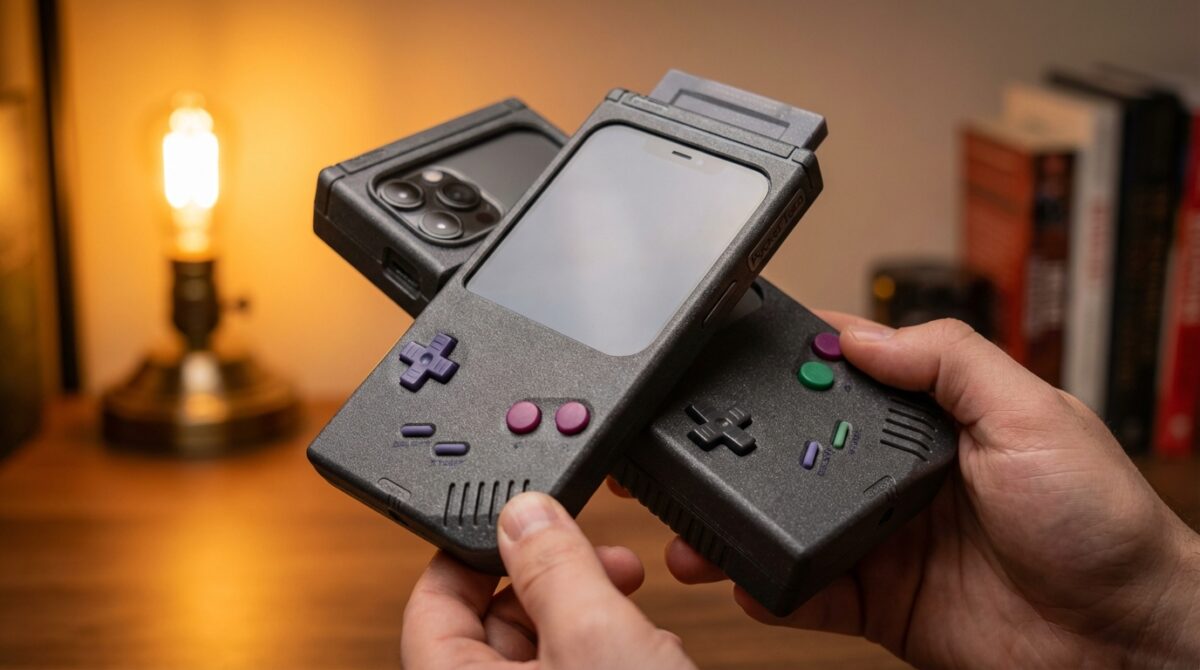
GameSir clearly wanted the Pocket Taco to evoke a Classic Game Boy without cloning it. The front layout keeps the familiar D-pad on the left and four face buttons on the right, with a start/select-style pair tucked neatly in between. Each button has a crisp click, closer to a quality handheld than a mushy budget controller. Even with large hands, the narrower body remains comfortable because the bottom edges are rounded rather than squared off.
On the back, two pairs of shoulder buttons sit around a USB-C charging port. These extra triggers open the door to 16-bit and beyond, making Super Nintendo or GBA titles feel natural. The unit includes its own 600mAh battery, so it communicates over Bluetooth without draining your phone. Once you flip the hinge open, the controller powers on and reconnects to the last paired device within seconds. That small detail encourages impulse play sessions, rather than forcing you through a settings menu ritual every time.
Comfort, portability and the trade-offs of the “taco” clamp
For frequent traveler Alex, who juggles flights, hotel rooms, and airport lounges, a controller needs to be both comfortable and easy to throw into a bag. The Pocket Taco ships with a hard plastic carrying case that protects the hinge and buttons from accidental presses. The downside is thickness: the combo is “pocketable” in a jacket or bag, less so in slim jeans. That is the price of a proper grip and a battery strong enough for a weekend of retro sessions.
While playing, the ergonomics sit somewhere between a classic handheld and a compact console pad. You support both the Pocket Taco and your phone with your fingers behind the device, while your thumbs handle the D-pad and buttons. Rounded edges help prevent hot spots on your fingers during longer play. The grip is not as relaxed as a full‑size home controller, yet it feels significantly better than glass-based Mobile Gaming, especially for action-heavy titles that demand precise inputs.
Screen access and the 45‑degree limitation
The clamp design introduces one clear compromise: the controller’s front shell can only tilt outward by about 45 degrees. When attached, it partly covers the lower portion of your screen. That is fine for portrait games or emulators with flexible layouts, but it makes quick interactions with notifications, messaging apps, or lock screens more awkward. Several users end up removing the Pocket Taco just to unlock the phone or jump between apps.
This is where comparisons with devices such as 8BitDo’s FlipPad become interesting. That controller lets its front panel fold down completely so you can access the entire display. After a week with the Pocket Taco, the value of that full flip becomes obvious. Yet the Taco answers with better battery independence, Bluetooth flexibility, and a more substantial Handheld feel. Your choice depends on whether you prioritize all-screen access or physical comfort and endurance.
Performance, Bluetooth pairing and emulator compatibility
Once paired, the Pocket Taco behaves like a standard Bluetooth gamepad rather than a quirky one-off accessory. On iOS, it often identifies as a DualShock 4, which is useful because many emulators and streaming apps already map layouts for Sony’s pad. You open the clamp, the pad wakes, your phone connects automatically, and you jump straight back into your previous game. The controller powers down when detached, conserving the internal battery without extra steps.
Alex used Delta and RetroArch to test Game Boy, Game Boy Color, Super Nintendo, and GBA titles. The D-pad felt tight enough for platformers, and the clicky buttons handled rapid-fire inputs without ghosting or missed presses. The GameSir companion app allows firmware updates and button remapping, shrinking into a half-screen interface when the Pocket Taco is attached. This half-height mode helps you reach menus, but it also reveals the practical effect of the controller covering part of the display.
Getting the best layout with your favorite emulator
Because the Pocket Taco works only in vertical orientation, you will want to shift your game view toward the top of the screen. If an Emulator centers the image vertically, the controller may hide critical UI elements. Alex encountered this when disabling Delta’s on-screen controls: the emulator placed the game in the middle of the display, and the lower part disappeared behind the Taco shell. A quick tweak of the layout fixed the issue, but it highlights the need to check each app’s display options.
For most 8‑bit and 16‑bit systems, this portrait style feels surprisingly natural. The device shines with classic handheld libraries and 2D consoles that focus on directional input and buttons, rather than dual-stick camera controls. That is why reviews such as those on retro hardware roundups often emphasize the Taco’s role as a dedicated Retro companion, not an all-purpose solution for every modern 3D title on the market.
Which games and platforms suit the Pocket Taco best
The deliberate omission of thumbsticks defines what the Pocket Taco is designed to do. It favors titles where a D-pad, face buttons, and shoulder inputs cover your needs. Think Tetris, Metroid, Final Fantasy VI, Advance Wars, or indie pixel platformers adapted to Mobile Gaming. These experiences feel right at home in a vertical orientation with physical buttons, and you avoid the awkwardness of virtual joysticks on glass.
Trying to wrestle a modern open-world action game that expects two analog sticks will feel compromised. Camera control via touch still works, yet it breaks the illusion of using a self‑contained Handheld. The trade-off is similar to how the Nintendo Switch excelled with many 2D indies and stylized 3D games while not matching every power-hungry blockbuster, a story examined in analyses of how Nintendo redefined console expectations. The Pocket Taco chooses focus over universality.
Using the Pocket Taco beyond your phone
One aspect that surprises many buyers is how easily the Pocket Taco becomes a standalone Bluetooth controller. You can power it on with the home button even when it is not clamped to anything, then pair it with a laptop, a tablet, or a living room device such as the Switch 2. For Alex, this meant traveling with one pad that handled cloud streaming on a hotel TV and retro handheld play on a phone.
Because it behaves like a standard gamepad, it slots neatly into setups where you already use Bluetooth controllers. Desktop emulators, browser games, or streaming services benefit from familiar inputs while you retain the same muscle memory across devices. This flexibility, combined with the price point around $35 reported in sources like detailed hands-on reviews, makes the Taco feel less like a novelty and more like a reliable travel companion.
Why the Pocket Taco resonates with modern nostalgia
Retro enthusiasm in 2026 is not only about collecting original cartridges. Many players grew up on the Classic Game Boy, then moved through smartphones, tablets, and cloud services. They want a way to reconcile those memories with modern hardware. The Pocket Taco meets that desire by letting your everyday Phone double as a focused Handheld that evokes specific tactile memories: the click of a D-pad, the feel of plastic under your thumbs, the posture of vertical Gaming.
Cultural moments such as the renewed interest in retro aesthetics, and even shows dissected in pieces like the analysis of dramatic TV finales, remind audiences how powerful nostalgia can be when combined with new technology. Hardware like the Pocket Taco channels that same energy into Mobile Gaming, making your device feel less like a generic slab and more like a personal console, tuned to the rhythms of your favorite 8‑ and 16‑bit worlds.
Key reasons people choose the Pocket Taco
When you look at how players actually use the controller, several patterns emerge. They often want quick access to short sessions, a dependable grip that does not feel like a toy, and a way to separate “serious play” from casual swiping. The Pocket Taco addresses these needs in a direct, almost understated way.
Common motivations include:
- Turning a daily commute into an opportunity for focused Retro play sessions.
- Carrying one Portable controller that works with phones, tablets, and home devices via Bluetooth.
- Replacing unreliable touch controls in emulators with physical inputs that respect classic game design.
- Recreating a Classic Game Boy posture without hunting for rare original hardware.
- Extending phone battery life by offloading control power to the Taco’s internal cell.
Does the Pocket Taco support both iOS and Android phones?
The Pocket Taco officially targets Android, but many users report seamless pairing with recent iOS devices where it appears as a standard Bluetooth controller such as a DualShock 4. Once paired, it works with most games and emulators that already support external pads.
What types of games feel best on the Pocket Taco?
The controller shines with 8‑bit and 16‑bit titles, including Game Boy, Game Boy Color, Super Nintendo, and GBA libraries. Games that rely on a D-pad and buttons, rather than dual analog sticks, feel the most natural due to the lack of thumbsticks on the Pocket Taco.
Can I use the Pocket Taco as a standalone controller?
Yes. You can power it on without attaching it to a phone and pair it with tablets, laptops, or compatible consoles. In this mode it behaves like a regular Bluetooth gamepad, which is useful for desktop emulators and streaming services.
Will the clamp damage my phone or its case?
Could the Google Pixel 10 Pro Boast the Ultimate Gaming Display?
The Amazingly Kodak Charmera: Stealing Hearts Despite Its Quirky Snapshots
The clamp interior uses soft silicone pads designed to grip without scratching. During extended use, phones might shift slightly from side to side, yet users report no scuffs or marks on bare devices or thicker protective cases. The hinge opens wide enough to accommodate most modern phones.
Is the Pocket Taco a good replacement for a full-size console controller?
For travel and Mobile Gaming, yes, because it balances compact size with comfortable inputs. For long living-room sessions or complex 3D games that require twin sticks, a full-size controller still offers better ergonomics and broader control options. Many players choose to use both, depending on context.
