Show summary Hide summary
- Lenovo’s detachable dual-screen ThinkPad concept explained
- Modular design: pogo pins, ports, and kickstand details
- Why this ThinkPad prototype matters for mobile professionals
- Serviceable ThinkPads and tablets: longevity as a design goal
- How businesses can prepare for modular laptops and concepts
- Practical checklist for evaluating future Lenovo modular devices
- What makes Lenovo’s dual-screen ThinkPad prototype different from other 2-in-1 devices?
- Is the detachable dual-screen ThinkPad prototype expected to become a commercial product soon?
- How heavy is the Lenovo dual-screen prototype compared with standard business laptops?
- What are the main benefits of Lenovo’s new serviceable ThinkPad T series and X13 Detachable?
- Which types of professionals are likely to gain the most from modular dual-screen laptops?
Lenovo’s detachable dual-screen ThinkPad concept explained
Imagine dropping a laptop on the table, snapping off part of the lid, and turning it into a second screen in under ten seconds. That instant shift from regular notebook to creative workstation captures why Lenovo’s detachable dual-screen ThinkPad prototype at Mobile World Congress is drawing so much attention from product designers, IT leads, and frequent travelers.
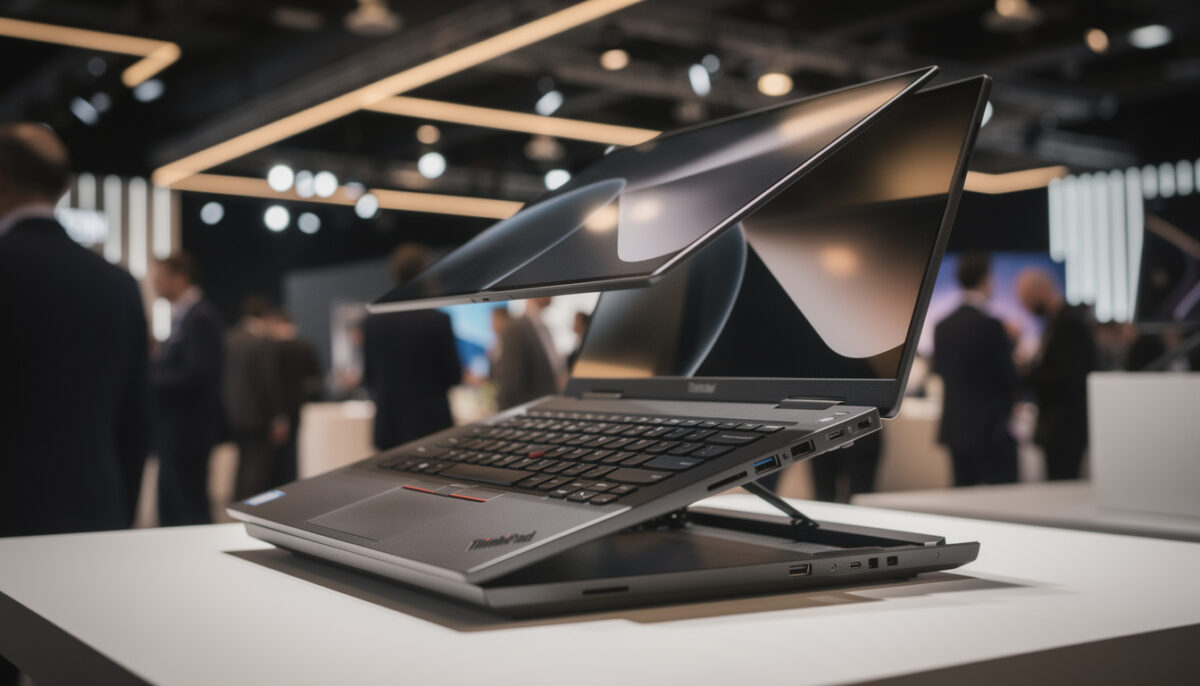
The Prototype, shown alongside Lenovo’s other concept machines at MWC 2026, pushes modularity far beyond a simple 2‑in‑1 hinge. It starts as a fairly standard 14‑inch ThinkPad-style Laptop, but the top cover hides a surprise: a second 14‑inch panel facing outward. This Dual-Screen design looks unconventional at first glance, yet its logic becomes obvious once you see how many ways it can reshape a working day. During a client meeting, for instance, you could keep your notes on the inner display while mirroring slides to the outer screen, avoiding the awkward “turn the laptop around” dance everyone knows too well.
From outward display to modular workspace
The central trick of this Lenovo concept lies in how the secondary panel detaches and reattaches. When clipped to the lid, outer-side out, it serves as a presentation surface or a quick status screen. Picture a sales engineer like Maya, who spends most weeks jumping between airports and client offices. While she types meeting notes, her customer sees a live product roadmap or dashboards on the opposite side, without needing a separate projector or tablet. That simple scenario already justifies the Prototype for a certain profile of mobile professional.
Qualcomm Unveils Snapdragon Wear Elite: A Cutting-Edge Chipset Tailored for Smartwatches and AI Gadgets
Top Xbox Series X and Series S Accessories to Elevate Your Gaming in 2026
The second mode unlocks once you remove the keyboard deck itself. Instead of treating the keyboard as an inseparable part of the Laptop, Lenovo turns it into a Bluetooth slab that docks via pogo pins when you want a classic clamshell feel. Pull it away, slot the second 14‑inch display where the keyboard used to sit, and you create a stacked dual-panel canvas. Writers get references on one screen and drafts on the other, while developers keep logs and terminals apart from code editors. This configuration goes beyond a Surface-style Detachable because the entire base becomes a display, not just a thin tablet tearing away from a stand.
Modular design: pogo pins, ports, and kickstand details
Lenovo has experimented with swappable components before through its Magic Bay accessory ecosystem, and you can see that heritage in the Prototype’s hardware language. The keyboard and the secondary panel latch onto the chassis using rows of pogo pins. These tiny spring-loaded contacts deliver both power and data without visible cables. A satisfying “snap” gives tactile confirmation that you aligned everything correctly, which matters when you are reconfiguring the machine in a crowded conference room between sessions.
Port modularity adds another layer of flexibility. Many business laptops force you to live with whatever combination of USB-A, USB-C, and HDMI the product manager chose two years before your purchase. Here, each side of the ThinkPad concept features a small bay where you can slide in different port modules. Extra pieces live in a compact case about the size of true wireless earbuds. If you spend most days in older meeting rooms, you keep multiple HDMI and USB-A blocks handy. If you live off Thunderbolt docks, you swap in more USB-C and leave legacy options at home, shaving grams from your bag.
Side monitor mode and its real-world compromises
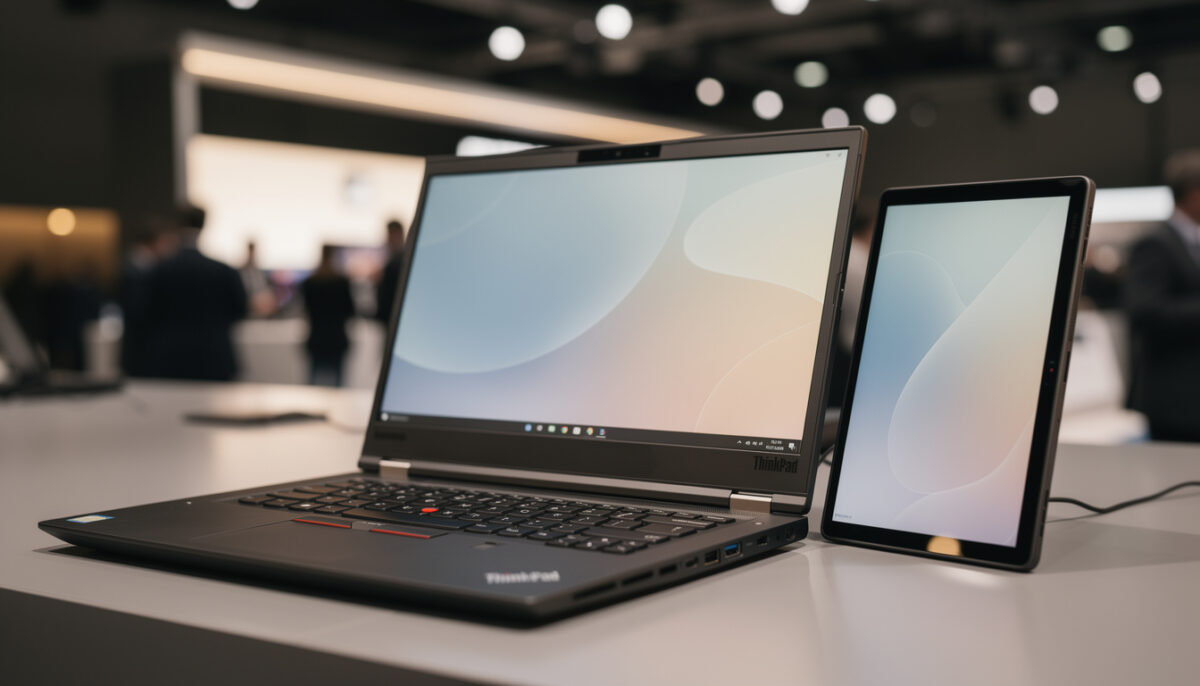
The third primary configuration of the detachable Dual-Screen system targets users who already travel with portable monitors. You pop the rear display off the lid, unfold the slim kickstand hidden on the Laptop’s underside, and prop the panel to the right or left of the main screen. Cabled over a single connector, the setup becomes a two-display workstation suitable for email triage, spreadsheet comparison, or design previews. Many content creators already carry 14‑ or 15‑inch USB-C monitors for this purpose; the Prototype aims to merge that accessory into the main machine.
The trade-off appears in the physical stability of the kickstand. Early hands-on impressions describe it as slightly flimsy, which means a firm bump to the desk could wobble the auxiliary display more than some users would like. A small rubber tip or a sturdier hinge tension could fix this in a production version. Even with that shortcoming, the advantage of having a detachable panel thin enough to resemble a dummy shell, yet fully functional, creates a compelling picture of how modular notebook Technology might evolve over the next two hardware generations.
Why this ThinkPad prototype matters for mobile professionals
From a distance, experimental devices at Mobile World Congress can feel like fleeting showpieces that will never leave the exhibition floor. The context around this Lenovo Prototype suggests a different story. According to coverage from outlets such as CNET’s hands-on report, the Modular design does not introduce noticeable weight penalties compared with typical 14‑inch business laptops. At roughly 3 pounds, the package sits comfortably in the same territory as mainstream ThinkPads, which matters when every gram counts during a long connection sprint.
For someone like Maya, the traveling engineer mentioned earlier, this means she no longer has to choose between portability and multi-monitor productivity. During a layover, she can slide the extra display beside the main panel, plug in a noise-cancelling headset, and work across documentation, design tools, and messaging apps without endless alt‑tabbing. Later, in a client workshop, she reverts to the outward-facing lid configuration to keep participants aligned on the same metrics. By minimizing compromises between modes, Lenovo presents Dual-Screen computing as a practical daily tool instead of a niche experiment.
Comparisons with existing detachable and 2‑in‑1 devices
Other manufacturers have chased similar ambitions. Microsoft’s Surface Pro line, which many professionals already know well, focuses on a single tablet display with a clip-on keyboard cover. Lenovo itself now offers the ThinkPad X13 Detachable, a more traditional tablet-laptop hybrid announced for commercial release with up to Intel Core Ultra chips and 64 GB of RAM. Reviews and previews from sources such as The Verge’s breakdown of the ThinkPad X13 Detachable highlight its aim to challenge both Surface Pro and iPad Pro in fields like healthcare and frontline sales.
The Prototype differs by centering modularity rather than just Detachable convenience. Where X13 Detachable or Surface Pro offer one main panel that sometimes docks, the dual-screen ThinkPad concept assumes you will constantly rearrange your workspace: stacked, mirrored, side-by-side, inward-facing, or outward-facing. That philosophy could shift how IT departments think about equipping staff. Instead of issuing separate tablets for presentations, monitors for office desks, and laptops for travel, a single modular kit could adapt to each location. The key question for Lenovo will be whether it can bring this flexibility to market without pushing costs beyond what procurement teams are ready to sign off.
Serviceable ThinkPads and tablets: longevity as a design goal
The detachable Dual-Screen Prototype did not appear alone at MWC. Lenovo also used the event to outline a broader push toward serviceability across its ThinkPad and ThinkTab lines. Recent generations of the ThinkPad T series, for instance, gain batteries that users can remove without tools. Two simple tabs allow field technicians or even end users to swap packs within minutes. That design decision has direct implications for companies trying to extend device lifecycles while meeting sustainability targets and controlling e‑waste volumes.
In the same spirit, bottom covers on the new T14 and T14s models open more easily, exposing simplified internal layouts and user-replaceable USB‑C ports. Anyone who has ever dealt with a damaged charging connector on a sealed ultrabook will recognize the value here. Instead of replacing an entire motherboard or scrapping the machine, technicians can focus on the small, vulnerable components. Lenovo indicates that the ThinkPad T14 can be configured with a 14‑inch 2.8K OLED panel and weighs around 2.8 pounds, while the T14s drops below 2.5 pounds despite its increased serviceability.
ThinkTab X11 and ThinkPad X13 Detachable: rugged and refined
On the tablet front, Lenovo’s ThinkTab X11 targets crews who need durability and Android flexibility rather than Windows compatibility. With an 11‑inch 2.5K display and a Qualcomm Snapdragon X‑series processor, the device aims at technicians, warehouse workers, and field surveyors who benefit from long battery life and responsive touch, but also require a form factor that survives daily knocks. A tool-less removable battery echoes the T-series design language, reinforcing the pattern of repair-friendly hardware across product families.
At the more premium end, the ThinkPad X13 Detachable joins Lenovo’s portfolio as a 13‑inch Windows tablet that clips into a folio keyboard. Media outlets such as PCMag and others have already framed it as a serious Surface Pro alternative, with configurations including Intel Core Ultra Series 3 processors and up to 64 GB of memory. Like the MWC Prototype, it builds on the Detachable idea, but with a focus on lightness and thin bezels rather than modular secondary displays. According to reports, Lenovo plans availability later in the year with pricing around the $1,999 mark, signaling its intent to capture knowledge workers who want a single, high-end device instead of juggling laptop and tablet.
How businesses can prepare for modular laptops and concepts
For IT decision-makers, concepts like the detachable dual-screen ThinkPad are not just curiosities. They offer a preview of how endpoint fleets may evolve over the next refresh cycle. When a Laptop doubles as an on-the-fly meeting display, second monitor, and modular dock host, software provisioning and support strategies must adapt. Questions around asset tracking become more complex too. Will the detachable second panel have its own inventory ID? How will support teams troubleshoot issues when part of the system is missing or damaged while the rest functions normally?
Forward-looking organizations can start by mapping which job roles would benefit most from modular dual-screen hardware. Teams that spend significant time in client-facing scenarios, such as consulting, field sales, and design agencies, often juggle external displays and shared screens already. Giving them an integrated system could reduce setup friction and simplify travel kits. At the same time, pilot projects should measure how staff actually use the additional display options over several months. Concepts sometimes promise mode flexibility that real users ignore after the novelty fades, so hard usage data will help determine whether the added complexity pays off.
Practical checklist for evaluating future Lenovo modular devices
To turn curiosity about devices like this ThinkPad Prototype into a concrete strategy, technology leaders can work through a short evaluation list. Each point focuses on outcomes rather than features, helping separate marketing buzz from genuine productivity gains.
- Identify workflows where a detachable second display would remove specific pain points, such as cramped spreadsheets or awkward client demos.
- Quantify how often employees already use external monitors on the road, and what weight or cable limitations they report.
- Review support capabilities for modular hardware, including spare-part logistics and technician training for pogo-pin connectors and swappable ports.
- Assess security implications, such as what happens if only the secondary screen is lost or stolen and whether sensitive content could remain cached there.
- Estimate total cost of ownership over four to five years, factoring in extended lifespan from replaceable batteries and ports across the ThinkPad range.
What makes Lenovo’s dual-screen ThinkPad prototype different from other 2-in-1 devices?
The prototype combines two equal-size 14‑inch displays with a modular keyboard and swappable ports, allowing several distinct configurations: an outward-facing lid screen for presentations, a stacked dual-screen layout when the keyboard is detached, and a side monitor mode using a hidden kickstand. This goes beyond most 2‑in‑1 designs, which usually focus on a single tablet-style panel and a simple keyboard cover.
Is the detachable dual-screen ThinkPad prototype expected to become a commercial product soon?
Lenovo has presented the machine as a concept, showcasing what is technically possible with current components and its modular design language. The company has not confirmed a specific retail launch or pricing. However, features like pogo-pin accessories and serviceable parts are already appearing in shipping ThinkPad and ThinkTab models, suggesting elements of the concept may reach the market progressively.
How heavy is the Lenovo dual-screen prototype compared with standard business laptops?
Early demonstrations indicate that the prototype weighs around 3 pounds in its primary configuration, which is comparable to many 14‑inch business notebooks. The secondary display is particularly thin and light, designed to add versatility without significantly increasing the total carry weight for users who travel frequently.
What are the main benefits of Lenovo’s new serviceable ThinkPad T series and X13 Detachable?
Qualcomm Unveils Next-Gen Chip Designed to Power Wearable AI Devices
Lenovo’s Revamped ThinkPad Detachable Tablet Boasts a Larger Display and a Genuine Keyboard Experience
The latest ThinkPad T14 and T14s models offer tool-less removable batteries, easier access to internal components, and replaceable USB‑C ports, helping extend lifespan and simplify repairs. The ThinkPad X13 Detachable delivers a light 13‑inch Windows tablet with a folio keyboard and high-end components, offering a premium alternative to devices like Microsoft’s Surface Pro while echoing Lenovo’s broader focus on flexibility and longevity.
Which types of professionals are likely to gain the most from modular dual-screen laptops?
Mobile professionals who regularly navigate between collaboration, presentation, and deep-focus work scenarios stand to benefit most. Consultants, field sales teams, designers, and engineers who rely on multiple windows and frequent client interactions can use the detachable second display to streamline demos, maintain reference materials, and reduce reliance on external monitors or shared screens.